Shipping

Shipping

Shipping Configuration Overview

Set up and manage all aspects of shipping within your UltraCart store—from selecting carriers to customizing package types and tracking updates—to deliver a smooth fulfillment experience for both you and your customers.

Introduction / Overview

The Shipping Configuration area in UltraCart allows you to define how orders are shipped, what carriers you support, and what options your customers see during checkout. Configuring this section properly ensures accurate shipping rates, appropriate delivery options, and efficient order fulfillment.

Core Features:

  • Choose from a wide variety of supported shipping carriers.

  • Define shipping methods and rates available at checkout.

  • Set up packaging types for rate estimation or logistics.

  • Enable real-time order tracking with SMS and email notifications.

Note: Some shipping carriers (like EasyPost or Amazon Fulfilled Prime) require additional account setup or third-party credentials.


Quickstart / TL;DR

  1. Go to ConfigurationCheckoutShipping.

  2. Select and configure your shipping Carriers.

  3. Define customer-facing Methods (e.g., "Ground", "2-Day Air").

  4. Set up Packages for accurate dimensional rate calculations.

  5. Enable Tracking options for enhanced customer communication.


Key Sections of Shipping Configuration

1. Carriers

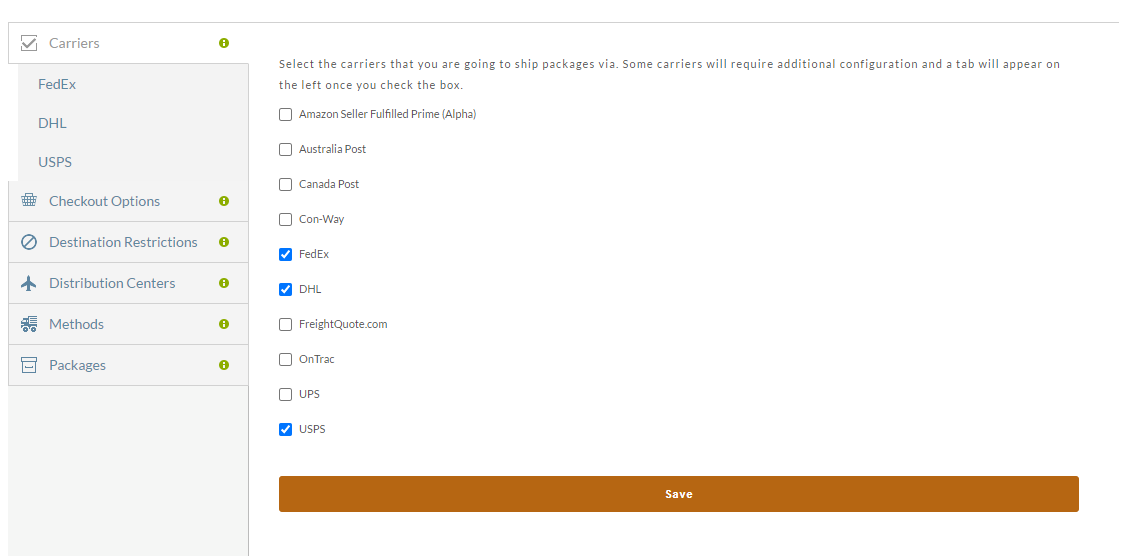
Choose which shipping carriers your store supports (UPS, USPS, FedEx, EasyPost, etc.). Each enabled carrier may require setup under its own configuration tab.

  • Navigate to Configuration → Checkout → Shipping → Carriers

  • Check the boxes for the carriers you want to support.

  • Click Save to activate tabs for additional configuration.

Note: Enabling a carrier displays a dedicated configuration tab in the sidebar.

UltraCart supports an almost limitless combination of shipping methods, and can calculate shipping costs in real-time for the following carriers:


2. Checkout Options

Define how shipping appears at checkout. Configure the customer-facing options like method labels, grouping strategies, and rate presentation logic.

Use this section to:

  • Customize how rates and options are grouped and named.

  • Set logic for cheapest vs. fastest shipping.

  • Adjust settings per shipping method or carrier.


3. Destination Restrictions

Restrict shipping by destination region (country, state, province, or ZIP code). This is useful for limiting where specific products or shipping methods are available.

Typical use cases:

  • Exclude PO Boxes or military addresses.

  • Restrict international shipping for certain items.


4. Distribution Centers

Set up one or more fulfillment locations from which orders are shipped. UltraCart uses this info to calculate shipping rates and delivery times accurately.

Each center can include:

  • Address details

  • Time zone

  • Carrier-specific shipping rules

5. Methods

Configure specific shipping services (like "UPS Ground" or "USPS Priority Mail") that customers will see during checkout.

  • Access via Shipping → Methods

  • Enable, edit, or delete individual services

  • Customize the display name

  • Choose a default shipping method

Note: Many methods can be toggled on/off and renamed to simplify the checkout experience.


6. Packages

Define the package types your store uses (e.g., box sizes, padded envelopes). These definitions help UltraCart calculate dimensional weight and select appropriate shipping rates.

  • Add custom or carrier-specific package types

  • Use USPS and FedEx One Rate flat-rate packaging

  • Match packages to shipping methods or SKUs for better estimation

Note: You don’t need to define packages unless you want dimensional accuracy—otherwise UltraCart will estimate based on weight.


7. Tracking

Enable UltraCart’s Order Tracking tools to keep your customers informed with real-time delivery updates via SMS and email.

Tracking includes:

  • SMS alerts (in/out for delivery, delivered)

  • Transactional emails with tracking links

  • Order management integration with shipment status

Pricing:

  • Basic order tracking with email updates (3¢ per shipment)

  • Enhanced order tracking with US SMS Notifications (5¢ per shipment)

Free 14-day trial is available to test tracking services.


Best Practices

  • Offer multiple carriers and methods to balance cost and delivery speed.

  • Name methods clearly (e.g., “Economy Shipping (5-8 Days)”).

  • Test checkout flow after changes to ensure a smooth customer experience.

  • Use tracking features to reduce customer service inquiries.

Conclusion & Next Steps

By configuring the shipping section thoroughly, you ensure accurate shipping costs, faster deliveries, and a better checkout experience. This setup is foundational for successful e-commerce logistics.