Checkout Options Tab
- Perry Tew
- Hunter Schaeffer
- Former user (Deleted)
About
The shipping configuration Checkout Options tab allows you to specify what shipping options you want to enable during the checkout process. To activate one of the features (each are explained below) place a check mark to the left of your choices.
Navigation
Navigate
Notice that to get the full list of fields you need to have the Advanced View toggled on:
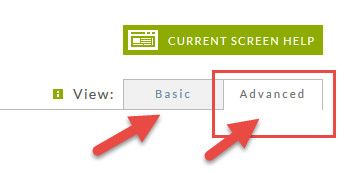
Once you toggle the advanced so it is the same color as the page you're on, you will see the following:
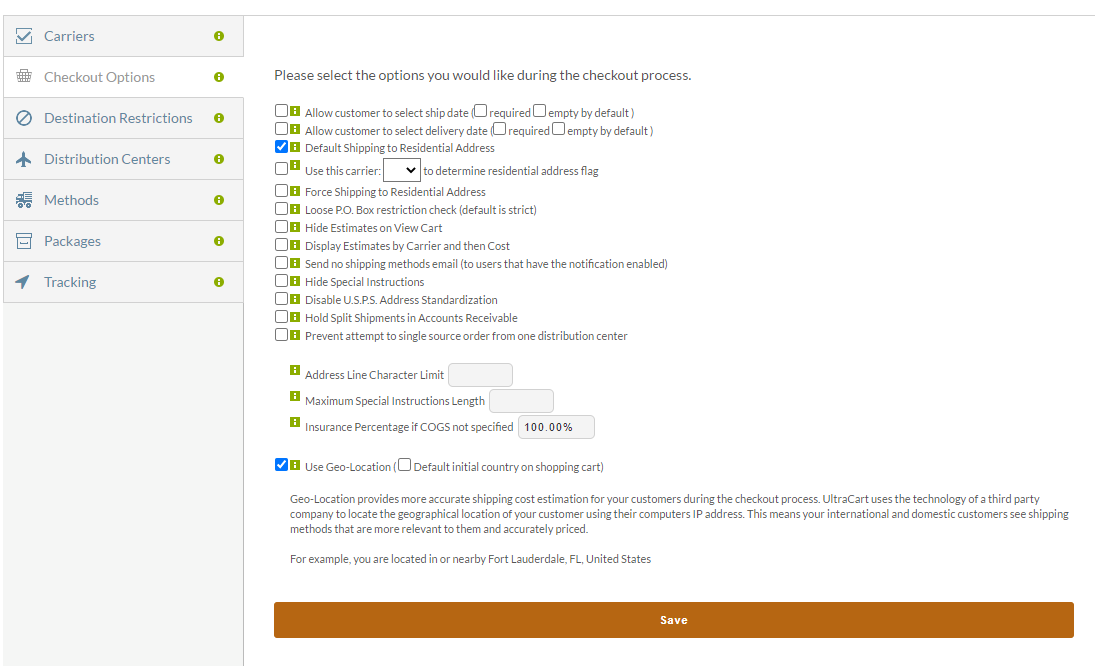
Configuration Options
| Field | Description |
|---|---|
Allow customer to select ship date | Turn this feature on to allow customers to enter a Ship Date during checkout. |
Allow customer to select delivery date | Turn this feature on to allow customers to enter a Delivery Date during checkout. The system will determine if the shipping method they choose can deliver the order by their specified date. If not, a message is displayed notifying them of such. |
| Default Shipping to Residential Address | A field is presented to the customer during checkout to allow them to specify if the shipping address is a Residence or a Business. Turn this feature ON so the default setting will automatically be for Residential Address. Customers can still change it to Business during checkout if applicable. |
Force Shipping to Residential Address | Some merchants do not want to ship to Business addresses due to additional costs deferred to the merchant. Turning this feature on will remove the option to select Business Addresses. |
| Loose P.O. Box restriction check (default is strict) | A strict restriction check looks to see if this field begins with the letter "P" and contains the word "box". If you check this box, this field cannot contain the word "box". About PO Boxes A true PO Box delivery address will have P.O. & Box in the "address 1" line and will not have an "address 2" line. If the customer complete a "address 2" then we will not enforce the PO Box restriction for the purpose of excluding UPS and FEDEX shipping methods. |
Hide Estimates on View Cart | Customers are shown shipping estimates for the shipping methods you've configured. Turn this feature ON to prevent the shipping estimations from appearing in the cart during checkout. |
Display Estimates by Carrier and then Cost | Check this box to have the shipping estimates grouped by carrier name and then by Cost. |
| Send no shipping methods email | Check this box to have an email notification sent to the merchant when "no shipping methods" are available for the order. The email will contain the Item Id(s), Qty and shipping address of the order. This information is supplied so the merchant can trouble shoot their shipping configuration to help correct the problem. |
Hide Special Instructions | During checkout, a text box is provided to allow the customer to type in Special Instructions. Turn this feature ON to prevent the Special Instructions text box from appearing during checkout. |
| Disable U.S.P.S. Address Standardization | When this field is unchecked, the system will query the USPS shipping API to check for a valid address format structure of the City, State, and Zip combination only (street address is not included at the present time) . Check this box to suppress this process from the checkout. |
Hold Split Shipments in Accounts Receivable | Some merchants have intentionally designated shipments for some items to be handled by multiple distribution centers (split shipment). Ship estimates take this into consideration. If an order inappropriately indicates split shipment when the item(s) are not configured as such, then that order will be held in Accounts Receivable. This gives the merchant an opportunity to make distribution center and shipping cost adjustments on the order prior to payment processing. |
| Prevent attempt to single source order from one distribution center | UltraCart by default will try to find a distribution center and source all items from it even if is technically farther away from the customer. The majority of the time this will keep the shipping costs lower than splitting the shipments between multiple DC's even if some items at another DC are closer to the destination address. This configuration will attempt to dissuade UltraCart from shipping everything from a single DC. Please be aware of the implications of this setting on your shipping before using. |
Maximum Address Line Length | This feature allows merchants to set the maximum number of characters allowed in the Shipping Address Field. The default is 32 characters. The maximum supported value is 50 characters. |
| Insurance Percentage if COGS not specified | One of the fields in the Item Editor is the Cost of Goods Sold (COGS). If this field is left blank, then the number (percent) enter in this box will apply. |
Use Geo-Location | Geo-Location is a service that allows UltraCart to better estimate shipping costs by utilizing a third-party database of internet address to physical location mappings. To decide whether to turn this service on or not, consider how many sales are lost due to poor estimates compared to actual shipping costs to the customer's destination. Help reduce the shock factor of shipping today and close more sales! Please note that there is no additional charge for this feature. Optional Setting: Default initial country on shopping cart ← When selected, the country will be set to the country that is identified via the geo-located IP address. Select this if you want the checkout to default to the geo-located country. |
| . |