Pending Clearance

Pending Clearance

Introduction

The Pending Clearance page in Order Management serves as the holding area for orders that require payment confirmation but do not settle in real time.

Merchants can use this page to monitor and manage these orders until payment is confirmed.

Prerequisites

  • Access to your UltraCart merchant account.

  • Permission to view and manage orders in Order Management.

Navigation

To access the Pending Clearance page:

  1. Log in to your UltraCart account.

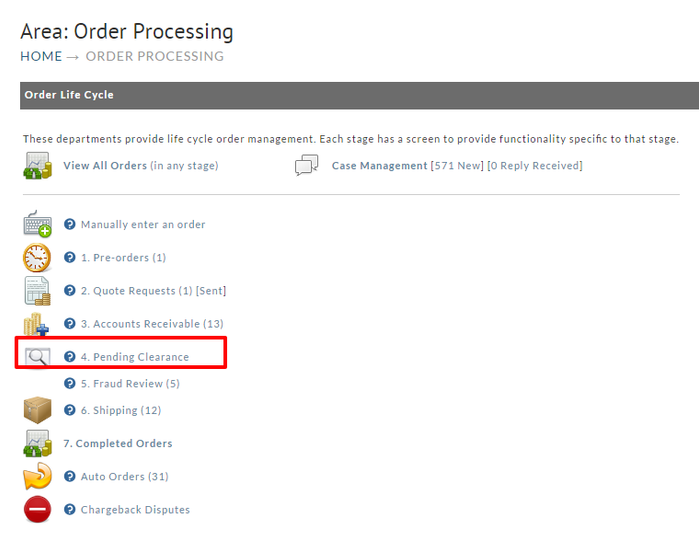
  2. From the main menu, navigate to:
    Operations → Order Management → Order Life Cycle → Pending Clearance

image-20250903-131542.png


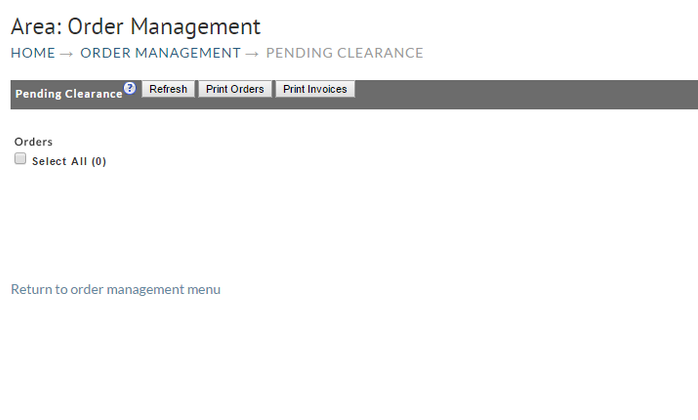
Viewing the Pending Clearance page:

image-20250903-131301.png


Payment Types in Pending Clearance

The following payment types may appear in the Pending Clearance queue:

  1. E-Checks – Orders placed using electronic checks that require bank clearance.

    • E-checks can be used as a direct payment method (e.g., via http://Authorize.Net ).

    • They can also be a funding source through PayPal.

Note: The newer Amazon Payments powered by Stripe does not place orders into a pending clearance state. These transactions are authorized and captured in real time, so they will not appear in this queue.Note: These orders remain in Pending Clearance until the payment provider confirms the transaction. Once cleared, they automatically move forward in the order life cycle.

FAQ

What should I do if an order remains in Pending Clearance for too long?

If an order stays in Pending Clearance beyond the expected settlement time:

  • Verify the payment status directly with the payment provider.

  • Contact the customer to confirm payment details if necessary.

  • Consider canceling the order if payment confirmation cannot be obtained.

Can I manually move an order out of Pending Clearance?

No. Orders only leave Pending Clearance once the payment provider confirms the transaction. This prevents accidental fulfillment before funds are secured.

Why do e-checks take longer to clear than other payment methods?

E-checks rely on traditional banking systems and can take several business days to clear. This is normal and expected.

How will I know when an order clears?

When payment confirmation is received:

  • The order will automatically move to the next stage in the Order Life Cycle (e.g., Approved Orders).

  • You will also see updates reflected in the order’s transaction history.

Can I notify customers while their order is in Pending Clearance?

Yes. You can configure customer communication settings in StoreFront → Communications → Notifications to keep customers informed about the status of their order.

Conclusion

The Pending Clearance queue ensures that merchants have visibility into all orders awaiting payment verification. Monitoring this area helps prevent fulfillment of orders before funds are secured.

Next Steps