How to create a customer profile from a placed order.
- Hunter Schaeffer
- Loyd James (Unlicensed)
Overview
This tutorial details the steps for creating a customer profile from a previous order. Customer profiles are useful for both your customers and for you the merchant.
The benefits for the customer include:
- the ability to review previous orders
- simplify and speed up the checkout process for future orders
- manage their auto orders
- provide product reviews
The benefits for you the merchant include:
- customer contact details are continuously updated
- improved analytical data about your customers
Steps to Creating a Customer profile from a placed order
- Locate the order using the "View all orders (in any stage)" or "Find Orders" widget on the Home page.
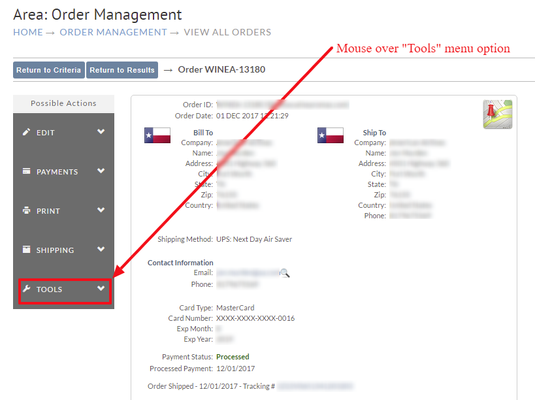
- Once you are viewing the order (in the full page view, not in the search results view), browse over the "Tools" menu option:
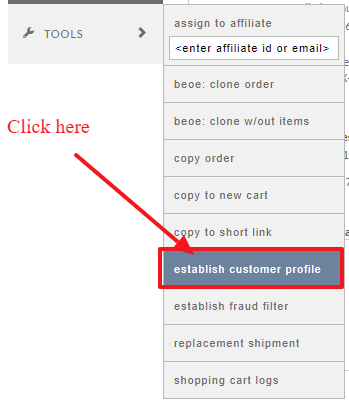
- Click the "Establish Customer Profile":
- The Customer Profile editor will open populated with the customer details from the order.
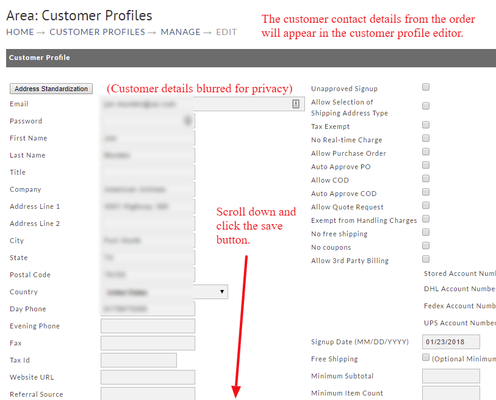
Review the details and then scroll to the bottom of the page and click the save button.
Creating a password for the profile
IMPORTANT NOTE:
You will need to create a password before saving the customer profile, oterhwise you'll get an error message upon attempting to save the profile: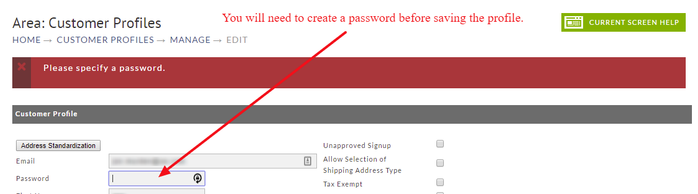
The customer will have an option to email the password to themselves so there is no need to send it to them.
After creating a password (recommend at least 6 characters preferably using a combination of upper and lowercase letters and numbers), scroll to the bottom of the page and click the SAVE button to preserve the profile.Congratulations! You've just created the customer profile.