3rd Party Marketing
Introduction
UltraCart supports integration with a wide range of third-party email marketing and customer engagement platforms. These integrations allow you to automatically sync customer data, trigger campaigns, and manage marketing workflows outside of UltraCart.
If you are not currently using a third-party email marketing service, we recommend reviewing the available providers to determine which best fits your business needs.
Tip: Many merchants combine these integrations with UltraCart’s built-in Reporting and AI Report Builder tools for deeper marketing insights and segmentation.
Navigation
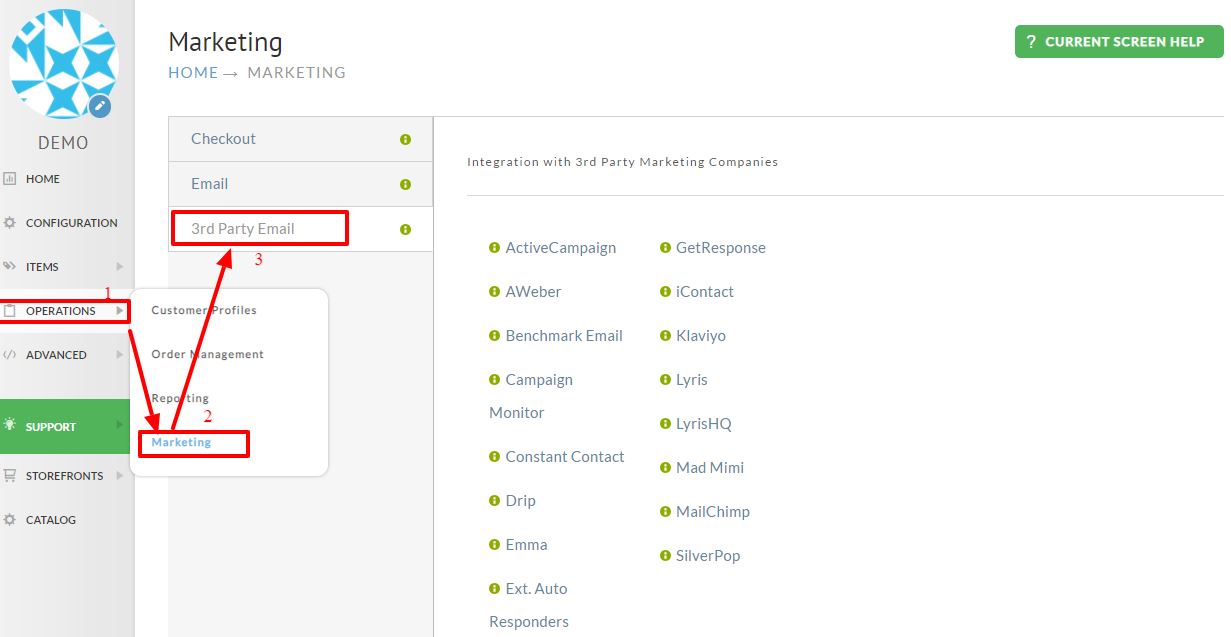
To configure your 3rd party marketing integration:
Log in to your UltraCart account.
Navigate to:
Operations → Marketing → 3rd Party Email
Click on the service you wish to configure.
Available 3rd Party Marketing Integrations
The following integrations are currently available within UltraCart. This list reflects the full set of providers shown in the Marketing interface.
Email Marketing & Automation Platforms
Provider | Notes |
|---|---|
ActiveCampaign | Advanced automation and CRM capabilities |
GetResponse | Email marketing and funnel builder |
Attentive | SMS and mobile-first marketing platform |
iContact | Email marketing and automation |
AWeber | Email marketing (updated API integration available) |
Iterable | Cross-channel marketing platform |
Benchmark Email | Email campaign management |
Klaviyo | eCommerce-focused email and SMS marketing |
Campaign Monitor | Email marketing and automation |
Lyris | Enterprise email marketing |
Constant Contact | Small business email marketing |
LyrisHQ | Enterprise marketing automation |
Drip | eCommerce CRM and automation |
MailChimp | Popular email marketing platform |
Emma | Email marketing with automation |
Mailvio | Email automation platform |
ExpertSender | Enterprise email marketing platform |
Maropost | Multi-channel marketing automation |
SilverPop | IBM Watson Campaign Automation |
Additional Integration Options
Provider | Notes |
|---|---|
External Auto Responders | Custom integrations via external systems |
How It Works
When configured, these integrations typically:
Subscribe customers to mailing lists during checkout
Sync customer data (email, name, order data)
Trigger campaigns based on:
Purchases
Abandoned carts
Subscription activity
Enable segmentation and lifecycle marketing
Each provider has its own configuration requirements, such as API keys, list IDs, or webhook endpoints.
Configuration Overview
While each integration varies slightly, the general setup process is:
Select your provider from the list.
Enter required credentials (API key, account ID, etc.).
Map UltraCart fields to the provider’s list fields.
Choose subscription behavior (opt-in, double opt-in, etc.).
Save configuration.
[Image Placeholder – Example Integration Configuration Screen]
Note: Some providers require additional configuration within their own platform (e.g., creating lists or enabling API access).
Reporting & Optimization
Once your integrations are active, you can analyze performance using UltraCart reporting tools.
Built-In Reporting
UltraCart provides multiple reports to evaluate marketing performance, including:
Customer acquisition reports
Item purchase behavior
Sales performance by campaign (via UTM tracking)
Customer value and cohort reports
These reports are accessible via:
Operations → Reporting ucdoc-Reporting-180226-134620
AI Report Builder (Recommended)
If you need deeper insights beyond standard reports, use the AI-powered reporting tools:
Ask questions in plain English
Generate custom SQL-based reports automatically
Visualize campaign performance, customer segments, and revenue trends
Example prompts:
“Show revenue by email campaign over the last 30 days”
“Compare repeat purchase rate by marketing source”
“Top performing products by email-driven traffic”
Tip: The AI Report Builder is the fastest way to create custom marketing performance reports without needing SQL knowledge. ucdoc-AI-Powered Report Builder…
Troubleshooting
Integration Not Syncing Contacts
Verify API credentials
Confirm list/audience IDs are correct
Check provider-side logs for errors
Customers Not Being Subscribed
Ensure opt-in settings are enabled
Verify checkout email capture is functioning
Confirm no suppression rules exist in provider
Missing Data in Campaigns
Ensure field mapping is configured correctly
Verify data is being passed during checkout events
Conclusion
UltraCart’s 3rd Party Marketing integrations allow you to connect your storefront with industry-leading email and marketing automation platforms. By combining these integrations with UltraCart’s reporting and AI tools, you can:
Automate customer engagement
Improve retention and lifetime value
Gain actionable insights into marketing performance
Next Steps
Configure your preferred marketing platform
Review Reporting → Financial & Customer Reports
Explore AI Report Builder for advanced insights
Set up automated campaigns (welcome, abandoned cart, post-purchase)