/
Old Order Handling
Old Order Handling
- Perry Tew
- Hunter Schaeffer
- Chris Torigian
Owned by Perry Tew
Last updated: Jun 20, 2022 by Hunter Schaeffer
Customers often place Check Orders and then either forget to mail the payment or change their mind. In order to prevent the Check Orders from piling up in accounts receivable, UltraCart can reject mail-in orders after a "user definable" number of days (typically 45 days). If a check order arrives after rejection, it is still possible to retrieve the order and process it. To configure your rejection period, enter the number of days into the box provided.
Max suggested days for this is 365 days.
UltraCart can also send customers a reminder after two weeks from order date. Reminders often cause customers to complete their check orders. Checking the "Remind customers about old orders" enables this option. Click the "Save" button when finished. 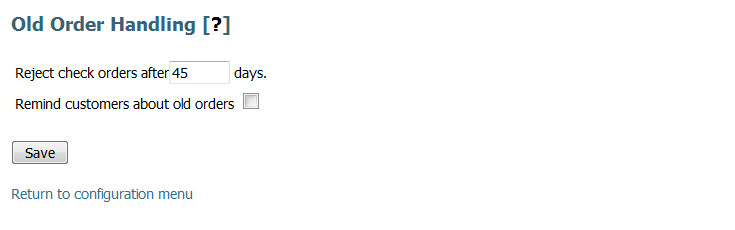
, multiple selections available,
Related content
Order Management
Order Management
More like this
Order Retention
Order Retention
More like this
Auto Order Processing
Auto Order Processing
More like this
Auto Orders
Auto Orders
More like this
Pre-Orders
Pre-Orders
More like this
Notifications about Auto Order Problems
Notifications about Auto Order Problems
More like this