UltraCart REST Site API
- Perry Tew
- Jonathan Tew
- Hunter Schaeffer
This is Version 1 of the UltraCart REST API. It is now legacy. It will remain forever, but no new development will be done.
Please see Version 2 for new development.
Version 2 Supplemental Documentaion
Introduction (Things you'll wish you read first)
The UltraCart REST API aims to be a lightweight protocol for tying a checkout page(s) to the UltraCart back end.
Every call needs a merchant id (our merchant id is DEMO). We need to know who you are. There are four ways to provide the merchant id to the server:
- Use your StoreFront url instead of secure.ultracart.com within your proxy script.
- Query Parameter:
_mid=DEMO - HTTP Header:
'X-UC-Merchant-Id': 'DEMO' - Cookie named
UltraCartMerchantId
The very best way is to use your StoreFront url. Every merchant has free StoreFronts with their account. Make sure you have one configured with a valid theme, and then change your proxy script to point to your StoreFront url. For example, change the destination from secure.ultracart.com to <MerchantID>.ultracartstore.com. Any requests directed to a StoreFront will automatically resolve the merchant id automatically.
Most of the examples below use the http header since it's easy to use with jQuery. If you wished to do it for all your ajax calls, you could execute this javascript:
jQuery.ajaxSetup({ cache: false, headers: {'X-UC-Merchant-Id': 'DEMO', "cache-control": "no-cache"});
However, that makes each call less atomic (and jQuery doesn't recommend it). Still, it's an option and make work well with your site.
If you receive an error "Missing Merchant ID", you've forgotten to do one of the above.
Now, in case you're wondering why the three methods use different names...
- We made the query parameter as short as possible to keep the urls as short as possible. We used an underscore to denote "meta data" to the call.
- We follow common practices for naming custom http headers. While the X- prefix is officially out of vogue, we still think it looks cool.
- The cookie 'UltraCartMerchantId' is used in hundred of existing UltraCart checkout pages. So it made sense to stick with that cookie name.
When something doesn't work or you get an error, open your browser console and view the headers. Look for the error.
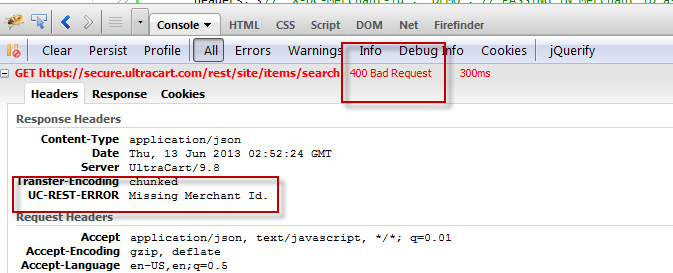
then fix it.
Can't? Then get on github.com. Ask for help.
Object Model
Any json objects referenced below may be found on the Checkout REST API screen. These two APIs have lots of overlap.
Site REST API
When a call takes an optional cart object, the method type will usually change from a 'get' to a 'post', and the post payload will be the cart's json. Don't forget to set the right type if you're passing in the cart.
/rest/site/stateProvinces
| Method | GET | Comments |
|---|---|---|
| Description | returns back all states for the country provided | This is a convenience function to retrieve all configured states for a country. |
Cookies | none | |
| Path Parameters | none | |
| Query Parameters | country | 'United States', 'Canada', etc. |
| Headers | none | |
| Receives Json | none | |
| Returns Json | String Array | Example: [ "Alabama", "Alaska", "American Samoa", "Arizona", "Arkansas", "Armed Forces Africa", "Armed Forces Americas", "Armed Forces Canada", "Armed Forces Europe", "Armed Forces Middle East", "Armed Forces Pacific", "California", "Colorado", "Connecticut", "Delaware", "District of Columbia", "Federated States of Micronesia", "Florida", "Georgia", "Guam", "Hawaii", "Idaho", "Illinois", "Indiana", "Iowa", "Kansas", "Kentucky", "Louisiana", "Maine", "Marshall Islands", "Maryland", "Massachusetts", "Michigan", "Minnesota", "Mississippi", "Missouri", "Montana", "Nebraska", "Nevada", "New Hampshire", "New Jersey", "New Mexico", "New York", "North Carolina", "North Dakota", "Northern Mariana Islands", "Ohio", "Oklahoma", "Oregon", "Palau", "Pennsylvania", "Puerto Rico", "Rhode Island", "South Carolina", "South Dakota", "Tennessee", "Texas", "Utah", "Vermont", "Virgin Islands", "Virginia", "Washington", "West Virginia", "Wisconsin", "Wyoming" ] Example for include codes: [{"province":"Alabama","code":"AL"},{"province":"Alaska","code":"AK"},{"province":"American Samoa","code":"AS"}, |
  function stateProvinces() {
    var country = jQuery('#stateProvincesCountry').val() || 'United States';
    jQuery.ajax({
      url: '/rest/site/stateProvinces',
      data: {country: country},
      type: 'get',
      headers: {'X-UC-Merchant-Id': 'DEMO',
        "cache-control": "no-cache"}, // could also pass merchant id as query parameter named '_mid' or cookie named 'UltraCartMerchantId'
      dataType: 'json'
    }).done(function (states) {
          jQuery('#stateProvincesResult').html('<pre>' + JSON.stringify(states, null, '  ') + '</pre>');
        });
  }
  jQuery(document).ready(function () {
    jQuery('#stateProvincesButton').on('click', stateProvinces);
  });
<div class='demo'><a class='demo-link' name="demo14"></a>
  <h4 class='title'>Get State Provinces</h4>
  <div class='details'>
    Country: <input type="text" id="stateProvincesCountry" value="United States"/>
    <input type="button" class='demo-button' value="Get States/Provinces" id="stateProvincesButton"/>
    <script type="syntaxhighlighter" class="brush: javascript" id="demo-code-display14"></script>
    Result:
    <div class="results" id="stateProvincesResult"></div>
  </div>
</div>
/rest/site/stateProvinceCodes
| Method | GET | Comments |
|---|---|---|
| Description | returns back all state codes for the country provided | This is just like /rest/site/stateProvinces, but it returns back codes instead of long names. |
Cookies | none | |
| Path Parameters | none | |
| Query Parameters | country | 'United States', 'Canada', etc. |
| Headers | none | |
| Receives Json | none | |
| Returns Json | String Array | Example: [ "AL", "AK", "AS", "AZ", "AR", "CA", "CO", "CT", "DE", "DC", "FM", "FL", "GA", "GU", "HI", "ID", "IL", "IN", "IA", "KS", "KY", "LA", "ME", "MH", "MD", "MA", "MI", "MN", "MS", "MO", "MT", "NE", "NV", "NH", "NJ", "NM", "NY", "NC", "ND", "MP", "OH", "OK", "OR", "PW", "PA", "PR", "RI", "SC", "SD", "TN", "TX", "UT", "VT", "VI", "VA", "WA", "WV", "WI", "WY", "AE", "AA", "AE", "AE", "AE", "AP" ] |
    function stateProvinceCodes() {
    var country = jQuery('#stateProvinceCodesCountry').val() || 'United States';
    jQuery.ajax({
      url: '/rest/site/stateProvinceCodes',
      data: {country: country},
      type: 'get',
      headers: {'X-UC-Merchant-Id': 'DEMO',
        "cache-control": "no-cache"}, // could also pass merchant id as query parameter named '_mid' or cookie named 'UltraCartMerchantId'
      dataType: 'json'
    }).done(function (statesCodes) {
          jQuery('#stateProvinceCodesResult').html('<pre>' + JSON.stringify(statesCodes, null, '  ') + '</pre>');
        });
  }
  jQuery(document).ready(function () {
    jQuery('#stateProvinceCodesButton').on('click', stateProvinceCodes);
  });
<div class='demo'><a class='demo-link' name="demo15"></a>
  <h4 class='title'>Get State Province Codes</h4>
  <div class='details'>
    Country: <input type="text" id="stateProvinceCodesCountry" value="United States"/>
    <input type="button" class='demo-button' value="Get States/Provinces" id="stateProvinceCodesButton"/>
    <script type="syntaxhighlighter" class="brush: javascript" id="demo-code-display15"></script>
    Result:
    <div class="results" id="stateProvinceCodesResult"></div>
  </div>
</div>
/rest/site/storeFront/searchAutoSuggest
| Method | GET | Comments |
|---|---|---|
| Description | returns back suggestions and result items based upon current search | This is just like /rest/site/stateProvinces, but it returns back codes instead of long names. |
Cookies | none | |
| Path Parameters | none | |
| Query Parameters | search thumbnailHeight thumbnailWidth | Users search string. Don't submit until 3 characters long. thumbnailHeight/thumbnailWidth take precedence over thumbnailSize. Valid values are: Widths: 80, 100, 200, 220, 250, 500 |
| Headers | none | |
| Receives Json | none | |
| Returns Json | A complex object containing suggestions and results. | Example: { |
/rest/site/unifiedAffiliateCookieScript
| Method | GET | Comments |
|---|---|---|
| Description | returns back a url that can be used to construct a script element. When run, that script will set cookies to track affiliates across domains. | There's lot of ways to run the script. jQuery makes it easy. |
Cookies | none | |
| Path Parameters | none | |
| Query Parameters | secureHostName - the domain you wish to track affiliates on _mid - your Merchant ID (could also use header or cookie - see example) | www.mystorenamehere.com |
| Headers | none | |
| Receives Json | none | |
| Returns Json | This returns a text string, not Json! | Example: https://secure.ultracart.com/checkout/unifiedAffiliateCookie.jsp?merchantId=DEMO&secureHostName=www.mystorenamehere.com |
 function unifiedAffiliateScript() {
    var merchantId = 'DEMO';
    var secureHostName = "www.mystorenamehere.com";
    jQuery.ajax({
      url: '/rest/site/unifiedAffiliateCookieScript',
      data:{secureHostName: secureHostName},
      type: 'get',
      headers: {'X-UC-Merchant-Id': merchantId, // this is one way to pass MID
        "cache-control": "no-cache"}, // could also pass merchant id as query parameter named '_mid' or cookie named 'UltraCartMerchantId'
      dataType: 'text'  // NOTE: This returns back plain text!
    }).done(function (script) {
          jQuery('#unifiedAffiliateCookieScriptResult').html('<pre>' + script + '</pre>');
        });
  }
  jQuery(document).ready(function () {
    jQuery('#unifiedAffiliateCookieScriptButton').on('click', unifiedAffiliateScript);
  });
<div class='demo'><a class='demo-link' name="demo16"></a>
  <h4 class='title'>Unified Affiliate Cookie Script</h4>
  <div class='details'>
    <input type="button" class='demo-button' value="Get Script" id="unifiedAffiliateCookieScriptButton"/>
    <script type="syntaxhighlighter" class="brush: javascript" id="demo-code-display16"></script>
    Result:
    <div class="results" id="unifiedAffiliateCookieScriptResult"></div>
  </div>
</div>
/rest/site/advertisingSources
| Method | GET | Comments |
|---|---|---|
| Description | returns back a string array of all advertising sources for a merchant and (optionally) a specific theme code. | |
Cookies | none | |
| Path Parameters | none | |
| Query Parameters | screenBrandingThemeCode | Theme code is optional. If not provided, the default is used (DFLT). To manage your theme codes, login to the back end (secure.ultracart.com) and navigate to Home → Configuration → Look and Feel Section → Screen Branding Themes |
| Headers | none | |
| Receives Json | none | |
| Returns Json | A string array of advertising sources | Example: [ "ABC Family", "Allure Magazine", "BBC America", "Biography Channel", "Cosmopolitan Magazine", "CW+", "Discovery Health", "Discovery Home", "DIY Channel", "E! Channel", "Elle Magazine", "Enquirer", "Essence Magazine", "First For Women Magazine", "Food Channel", "Friend/Family", "GAC", "Glamour Magazine", "Google", "HGTV", "In Style Magazine", "Internet Search Engines", "ION", "Ladies Home Journal", "Lifetime Movies Network", "Lucky Magazine", "Mailer", "Marie Claire Magazine", "Money Mailer Coupon", "MTV", "O, The Oprah Magazine", "OK magazine", "Oxygen Channel", "Quick and Simple Magazine", "Radio", "Redbook Magazine", "Self Magazine", "Shape Magazine", "Soapnet Channel", "Star Magazine", "Style Channel", "Tennis Channel", "Us Weekly Magazine", "VH1", "Vogue Magazine", "WeTV", "Woman's World Magazine", "WWD Magazine", "Yahoo!" ] |
   function advertisingSources() {
    var themeCode = "DFLT";
    jQuery.ajax({
      url: '/rest/site/advertisingSources',
      data:{screenBrandingThemeCode: themeCode},
      type: 'get',
      headers: {'X-UC-Merchant-Id': 'SANTI', // this is one way to pass MID
        "cache-control": "no-cache"}, // could also pass merchant id as query parameter named '_mid' or cookie named 'UltraCartMerchantId'
      dataType: 'json'
    }).done(function (sources) {
          jQuery('#advertisingResult').html('<pre>' + JSON.stringify(sources, null, '  ') + '</pre>');
        });
  }
  jQuery(document).ready(function () {
    jQuery('#advertisingButton').on('click', advertisingSources);
  });
<div class='demo'><a class='demo-link' name="demo17"></a>
  <h4 class='title'>Advertising Sources</h4>
  <div class='details'>
    <input type="button" class='demo-button' value="Get Advertising Sources" id="advertisingButton"/>
    <script type="syntaxhighlighter" class="brush: javascript" id="demo-code-display17"></script>
    Result:
    <div class="results" id="advertisingResult"></div>
  </div>
</div>
/rest/site/returnPolicy
| Method | GET | Comments |
|---|---|---|
| Description | returns back a plain text string of the merchant's return policy | returns back the policy for the default theme (DFLT) unless the theme is specified Fetches a merchant's return policy. Some of you guys have massive return policies, especially |
Cookies | none | |
| Path Parameters | none | |
| Query Parameters | screenBrandingThemeCode | Theme code is optional. If not provided, the default is used (DFLT). To manage your theme codes, login to the back end (secure.ultracart.com) and navigate to Home → Configuration → Look and Feel Section → Screen Branding Themes |
| Headers | none | |
| Receives Json | none | |
| Returns Json | This returns a text string, not Json! | Example: I want you to love your jewelry item. If you are not completely satisfied with your purchase you may return the item within 14 days of receiving it for exchange or credit ONLY (excludes custom orders). Item must be in its' original packaging and in perfect, unused condition. Sorry, shipping costs will not be refunded. |
function returnPolicy() {
    var themeCode = "DFLT";
    jQuery.ajax({
      url: '/rest/site/returnPolicy',
      data:{screenBrandingThemeCode: themeCode},
      type: 'get',
      headers: {'X-UC-Merchant-Id': 'DEMO', // this is one way to pass MID
        "cache-control": "no-cache"}, // could also pass merchant id as query parameter named '_mid' or cookie named 'UltraCartMerchantId'
      dataType: 'text' // NOTICE the data type.  This returns plain text.
    }).done(function (returnPolicy) {
          jQuery('#returnPolicyResult').html('<pre>' + returnPolicy + '</pre>');
        });
  }
  jQuery(document).ready(function () {
    jQuery('#returnPolicyButton').on('click', returnPolicy);
  });
<div class='demo'><a class='demo-link' name="demo18"></a>
  <h4 class='title'>Return Policy</h4>
  <div class='details'>
 <input type="button" class='demo-button' value="Get Return Policy" id="returnPolicyButton"/>
    <script type="syntaxhighlighter" class="brush: javascript" id="demo-code-display18"></script>
    Result:
    <div class="results" id="returnPolicyResult"></div>
  </div>
</div>
/rest/site/allowedCountries
| Method | GET | Comments |
|---|---|---|
| Description | returns back a string array of all countries a merchant ships to | |
Cookies | none | |
| Path Parameters | none | |
| Query Parameters | none | |
| Headers | none | |
| Receives Json | none | |
| Returns Json | A string array of countries | Example: [ "Afghanistan", "Albania", "Algeria", "American Samoa", "Andorra", "Angola", "Anguilla", "Antigua", "Argentina", "Armenia", "Aruba", "Australia", "Austria", "Azerbaijan", "Azores", "Bahamas", "Bahrain", "Bangladesh", "Barbados", "Barbuda", "Belarus", "Belgium", "Belize", "Benin", "Bermuda", "Bhutan", "Bolivia", "Bonaire", "Bosnia and Herzegovina", "Botswana", "Brazil", "British Virgin Islands", "Brunei Darussalam", "Bulgaria", "Burkina Faso", "Burundi", "Cambodia", "Cameroon", "Canada", "Canary Islands", "Cape Verde Islands", "Cayman Islands", "Central African Republic", "Chad", "Channel Islands", "Chile", "China", "Christmas Island", "Cocos Islands", "Colombia", "Comoros", "Congo", "Cook Islands", "Costa Rica", "Cote d'Ivoire", "Croatia", "Cuba", "Curacao", "Cyprus", "Czech Republic", "Denmark", "Djibouti", "Dominica", "Dominican Republic", "Ecuador", "Egypt"] ... and many more ... |
  function allowedCountries() {
    jQuery.ajax({
      url: '/rest/site/allowedCountries',
      type: 'get',
      headers: {'X-UC-Merchant-Id': 'DEMO', // this is one way to pass MID
        "cache-control": "no-cache"}, // could also pass merchant id as query parameter named '_mid' or cookie named 'UltraCartMerchantId'
      dataType: 'json'
    }).done(function (countries) {
          jQuery('#allowedCountriesResult').html('<pre>' + JSON.stringify(countries, null, '  ') + '</pre>');
        });
  }
  jQuery(document).ready(function () {
    jQuery('#allowedCountriesButton').on('click', allowedCountries);
  });
<div class='demo'><a class='demo-link' name="demo19"></a>
  <h4 class='title'>Allowed Countries</h4>
  <div class='details'>
    <input type="button" class='demo-button' value="Get Allowed Countries" id="allowedCountriesButton"/>
    <script type="syntaxhighlighter" class="brush: javascript" id="demo-code-display19"></script>
    Result:
    <div class="results" id="allowedCountriesResult"></div>
  </div>
</div>
rest/site/customerIpAddress
| Method | GET | Comments |
|---|---|---|
| Description | returns back the customer's ip address | |
Cookies | none | |
| Path Parameters | none | |
| Query Parameters | none | |
| Headers | none | |
| Receives Json | none | |
| Returns Json | Plain Text! IP Address | Example: 127.0.0.1 |
    function customerIpAddress() {
    jQuery.ajax({
      url: '/rest/site/customerIpAddress',
      type: 'get',
      headers: {'X-UC-Merchant-Id': 'DEMO', // this is one way to pass MID
        "cache-control": "no-cache"}, // could also pass merchant id as query parameter named '_mid' or cookie named 'UltraCartMerchantId'
      dataType: 'text' // Note! Plain text string
    }).done(function (ipAddress) {
          jQuery('#customerIpAddressResult').html('<pre>' + ipAddress + '</pre>');
        });
  }
  jQuery(document).ready(function () {
    jQuery('#customerIpAddressButton').on('click', customerIpAddress);
  });
<div class='demo'><a class='demo-link' name="demo20"></a>
  <h4 class='title'>Customer IP Address</h4>
  <div class='details'>
    <input type="button" class='demo-button' value="Get Allowed Countries" id="customerIpAddressButton"/>
    <script type="syntaxhighlighter" class="brush: javascript" id="demo-code-display20"></script>
    Result:
    <div class="results" id="customerIpAddressResult"></div>
  </div>
</div>
/rest/site/items/search
| Method | GET | Comments |
|---|---|---|
| Description | search for items, and returns back a paginated result search. | |
Cookies | none | |
| Path Parameters | none | |
| Query Parameters |
thumbnailSize thumbnailWidth thumbnailHeight | string, the search term to look for. integer integer this name is used in the url construction (see example results) so that the view urls are already pointing at your server. optional integer: for square thumbnails, one of these values: 80, 100, 200, 220, 250, 500. This is an optional parameter. The default is 80px. thumbnailHeight/thumbnailWidth take precedence over thumbnailSize. Valid values are: Widths: 80, 100, 200, 220, 250, 500 |
| Headers | none | |
| Receives Json | none | |
| Returns Json | A complex object containing pagination information and an array of items | Example: {
"totalResults": 1,
"currentPage": 1,
"totalPages": 1,
"items": [
{
"extendedDescription": "",
"description": "BONE",
"thumbnailUrl": "1369252924157/DEMO/8/9/80-80-89BDA673BC716255B7EC50069B4A398F.jpg",
"cost": 20,
"viewUrl": "http://secure.ultracart.com/catalog/DEMO/products/facebook/fb-single/Bone.html",
"addToCartUrl": "/cgi-bin/UCEditor?merchantId=DEMO&ADD=Bone"
}
]
}to use the thumbnail, append it to The addToCartUrl should be appended to |
    function itemSearch() {
    var merchantId = jQuery('#itemSearchMerchantId').val() || 'DEMO';
    var search = jQuery('#itemSearchField').val() || '';
    var itemsPerPage = 5;
    var currentPage = 1;
    var secureServerName = "secure.ultracart.com";
    var data ={
      _mid:merchantId,
      search:search,
      itemsPerPage:itemsPerPage,
      currentPage:currentPage,
      secureServerName: secureServerName
    };

    jQuery.ajax({
      url: '/rest/site/items/search',
      type: 'get',
      data: data,
      headers: {// 'X-UC-Merchant-Id': 'DEMO', // PASSING IN Merchant ID as parameter so you can try your own!
        "cache-control": "no-cache"}, // could also pass merchant id as query parameter named '_mid' or cookie named 'UltraCartMerchantId'
      dataType: 'json'
    }).done(function (results) {
          jQuery('#itemSearchResult').html('<pre>' + JSON.stringify(results, null, '  ') + '</pre>');
        });
  }
  jQuery(document).ready(function () {
    jQuery('#itemSearchButton').on('click', itemSearch);
  });
<div class='demo'><a class='demo-link' name="demo21"></a>
  <h4 class='title'>Item Search</h4>
  <div class='details'>

    Merchant ID: <input type="text" id="itemSearchMerchantId" value='DEMO' /><br>
    Search Term: <input type="text" id="itemSearchField" value='BONE' /><br>
    <input type="button" class='demo-button' value="Search for Items" id="itemSearchButton"/>
    <script type="syntaxhighlighter" class="brush: javascript" id="demo-code-display21"></script>
    Result:
    <div class="results" id="itemSearchResult"></div>
  </div>
</div>
/rest/site/items
| Method | GET | Comments |
|---|---|---|
| Description | retrieves a list of items | if both ids and url are provided, url is used. |
Cookies | none | |
| Path Parameters | none | |
| Query Parameters |
url
thumbnailHeight
| &id=item1&id=item2&id=item3 If you are going to request more than one item id at a time via jQuery, make sure that you set traditional = true in your ajaxSettings. the full url to a catalog group. this must be a valid catalog group. Example: https://secure.ultracart.com/catalog/DEMO/rest_demo/ (the url above will show an ugly page. It was created for the item data, not to serve as a fully functional page. optional integer: convenience parameters for square thumbnails using one of these values: 80, 100, 200, 220, 250, 500. This is an optional parameter. The default is 80px. thumbnailHeight/thumbnailWidth take precedence over thumbnailSize. Valid values are: Widths: 80, 100, 200, 220, 250, 500 If a cart id is passed in as a query, the associated cart is loaded and referenced. If the cart has a logged in customer (valid customer profile), then any items returned will have their pricing applied. |
| Headers | none | |
| Receives Json | none | |
| Returns Json | An array of Item objects (see Item definition above) | Example: [
{
"cases": [],
"minimumQuantity": 1,
"maximumQuantity": null,
"manufacturerSuggestedRetailPrice": null,
"viewUrl": "http://www.testajax.com/catalog/DEMO/products/facebook/fb-single/ATARI2600.html",
"options": [],
"allowBackorder": false,
"preorder": false,
"inventoryTracked": false,
"availableQuantity": 0,
"inStock": true,
"itemOid": 3707319,
"itemId": "ATARI2600",
"description": "Atari 2600",
"extendedDescription": "",
"cost": 999.99,
"weight": null,
"length": {
"uom": "CM",
"value": 0
},
"width": {
"uom": "CM",
"value": 0
},
"height": {
"uom": "CM",
"value": 0
},
"attributes": [],
"multimedias": [
{
"thumbnails": [
{
"height": 80,
"width": 80,
"httpUrl": "http://ultracartthumbs.s3.amazonaws.com/1347411615246/DEMO/4/6/80-80-466058B5603717FE5D5B2F1302FC06F0.jpg",
"httpsUrl": "https://s3.amazonaws.com/ultracartthumbs/1347411615246/DEMO/4/6/80-80-466058B5603717FE5D5B2F1302FC06F0.jpg"
},
{
"height": 100,
"width": 100,
"httpUrl": "http://ultracartthumbs.s3.amazonaws.com/1363399269313/DEMO/4/6/100-100-466058B5603717FE5D5B2F1302FC06F0.jpg",
"httpsUrl": "https://s3.amazonaws.com/ultracartthumbs/1363399269313/DEMO/4/6/100-100-466058B5603717FE5D5B2F1302FC06F0.jpg"
},
{
"height": 200,
"width": 200,
"httpUrl": "http://ultracartthumbs.s3.amazonaws.com/1363399250806/DEMO/4/6/200-200-466058B5603717FE5D5B2F1302FC06F0.jpg",
"httpsUrl": "https://s3.amazonaws.com/ultracartthumbs/1363399250806/DEMO/4/6/200-200-466058B5603717FE5D5B2F1302FC06F0.jpg"
}
],
"type": "Image",
"default": true,
"imageWidth": 600,
"imageHeight": 335,
"viewUrl": "http://s3.amazonaws.com/ultracart/im/3F44E1FC096C0E0131DF4BBF5B051400?AWSAccessKeyId=0P4TXH5AKGYC8WHDZFG2&Expires=1371107686&Signature=EM5lMfjnmWk4ak2z6DVjEJ2uueg%3D",
"description": "",
"code": null,
"excludeFromGallery": false
}
],
"defaultImageUrl": "http://s3.amazonaws.com/ultracart/im/3F44E1FC096C0E0131DF4BBF5B051400?AWSAccessKeyId=0P4TXH5AKGYC8WHDZFG2&Expires=1371107686&Signature=EM5lMfjnmWk4ak2z6DVjEJ2uueg%3D",
"defaultThumbnailUrl": "http://ultracartthumbs.s3.amazonaws.com/1347411615246/DEMO/4/6/80-80-466058B5603717FE5D5B2F1302FC06F0.jpg",
"variations": []
},... additional items here ... ] |
function items() {
    var merchantId = jQuery('#itemsMerchantId').val() || 'DEMO';
    var items = jQuery('#itemsField').val() || '';
    items = items.split(','); // change the string into an array.
    var url = jQuery('#itemsUrlField').val() || '';
    var data = {
      _mid: merchantId,
      id: items,
      url: url
    };

    jQuery.ajax({
      url: '/rest/site/items',
      type: 'get',
      data: data,
      headers: {// 'X-UC-Merchant-Id': 'DEMO', // PASSING IN Merchant ID as parameter so you can try your own!
        "cache-control": "no-cache"}, // could also pass merchant id as query parameter named '_mid' or cookie named 'UltraCartMerchantId'
      dataType: 'json'
    }).done(function (items) {
          jQuery('#itemsResult').html('<pre>' + JSON.stringify(items, null, '  ') + '</pre>');
        });
  }
  jQuery(document).ready(function () {
    jQuery('#itemsButton').on('click', items);
  });
<div class='demo'><a class='demo-link' name="demo22"></a>
  <h4 class='title'>Items</h4>
  <div class='details'>
    <em>Note: The server expects a parameter array of items, not a csv list. The javascript routine splits the string by
      commas and creates an array.</em><br>
    <table>
      <tr>
        <td>Merchant ID:</td>
        <td><input type="text" id="itemsMerchantId" value='DEMO'/></td>
      </tr>
      <tr>
        <td>Search Term:</td>
        <td><input type="text" id="itemsField" value='BONE,PDF,Baseball,TSHIRT' size='100'/></td>
      </tr>
      <tr>
        <td>Catalog Group URL:</td>
        <td><input type="text" id="itemsUrlField" size='100'
                   value='https://secure.ultracart.com/catalog/DEMO/rest_demo/'/></td>
      </tr>
      <tr><td colspan='2'>Hey.  You can't just put any url in the field above. It must be a valid catalog group.</td></tr>
    </table>

    <input type="button" class='demo-button' value="Fetch Items" id="itemsButton"/>
    <script type="syntaxhighlighter" class="brush: javascript" id="demo-code-display22"></script>
    Result:
    <div class="results" id="itemsResult"></div>
  </div>
</div>
/rest/site/items/{item id}
| Method | GET | Comments |
|---|---|---|
| Description | retrieves a single item | |
Cookies | none | |
| Path Parameters | item id | this should be a valid merchant item id. For example: /rest/site/items/TSHIRT |
| Query Parameters | thumbnailSize thumbnailWidth thumbnailHeight cartId | optional integer: one of these values: 80, 100, 200, 220, 250, 500. This is an optional parameter. The default is 80px. Use this for square thumbnails, otherwise use both thumbnailWidth and thumbnailHeight thumbnailHeight/thumbnailWidth take precedence over thumbnailSize. Valid values are: Widths: 80, 100, 200, 220, 250, 500
|
| Headers | none | |
| Receives Json | none | |
| Returns Json | An Item object (see Item definition above) | Example: {
"cases": [],
"minimumQuantity": 1,
"maximumQuantity": null,
"manufacturerSuggestedRetailPrice": null,
"viewUrl": "http://www.testajax.com/catalog/DEMO/products/facebook/fb-single/PDF.html",
"options": [],
"allowBackorder": false,
"preorder": false,
"inventoryTracked": false,
"availableQuantity": -33,
"inStock": true,
"itemOid": 128754,
"itemId": "PDF",
"description": "PDF Sampler",
"extendedDescription": "",
"cost": 1,
"weight": null,
"length": {
"uom": "IN",
"value": 0
},
"width": {
"uom": "IN",
"value": 0
},
"height": {
"uom": "IN",
"value": 0
},
"attributes": [],
"multimedias": [
{
"thumbnails": [
{
"height": 200,
"width": 200,
"httpUrl": "http://ultracartthumbs.s3.amazonaws.com/1363189011276/DEMO/F/D/200-200-FDDC193869B9EB22A7ADFA776F613062.jpg",
"httpsUrl": "https://s3.amazonaws.com/ultracartthumbs/1363189011276/DEMO/F/D/200-200-FDDC193869B9EB22A7ADFA776F613062.jpg"
},
{
"height": 100,
"width": 100,
"httpUrl": "http://ultracartthumbs.s3.amazonaws.com/1368717402788/DEMO/F/D/100-100-FDDC193869B9EB22A7ADFA776F613062.jpg",
"httpsUrl": "https://s3.amazonaws.com/ultracartthumbs/1368717402788/DEMO/F/D/100-100-FDDC193869B9EB22A7ADFA776F613062.jpg"
},
{
"height": 80,
"width": 80,
"httpUrl": "http://ultracartthumbs.s3.amazonaws.com/1369393305697/DEMO/F/D/80-80-FDDC193869B9EB22A7ADFA776F613062.jpg",
"httpsUrl": "https://s3.amazonaws.com/ultracartthumbs/1369393305697/DEMO/F/D/80-80-FDDC193869B9EB22A7ADFA776F613062.jpg"
}
],
"type": "Image",
"default": true,
"imageWidth": 400,
"imageHeight": 400,
"viewUrl": "http://s3.amazonaws.com/ultracart/im/317BBF705AEB5C0130BD546683051600?AWSAccessKeyId=0P4TXH5AKGYC8WHDZFG2&Expires=1371108852&Signature=RKlBcOafFfPuTGKovA9g%2FRSlAwo%3D",
"description": "pdf icon",
"code": null,
"excludeFromGallery": false
}
],
"defaultImageUrl": "http://s3.amazonaws.com/ultracart/im/317BBF705AEB5C0130BD546683051600?AWSAccessKeyId=0P4TXH5AKGYC8WHDZFG2&Expires=1371108852&Signature=RKlBcOafFfPuTGKovA9g%2FRSlAwo%3D",
"defaultThumbnailUrl": "http://ultracartthumbs.s3.amazonaws.com/1369393305697/DEMO/F/D/80-80-FDDC193869B9EB22A7ADFA776F613062.jpg",
"variations": []
} |
function singleItem() {
    var item = jQuery('#itemField').val() || '';
    jQuery.ajax({
      url: '/rest/site/items/' + item,
      type: 'get',
      headers: { 'X-UC-Merchant-Id': 'DEMO',
        "cache-control": "no-cache"}, // could also pass merchant id as query parameter named '_mid' or cookie named 'UltraCartMerchantId'
      dataType: 'json'
    }).done(function (item) {
          jQuery('#itemResult').html('<pre>' + JSON.stringify(item, null, '  ') + '</pre>');
        });
  }
  jQuery(document).ready(function () {
    jQuery('#itemButton').on('click', singleItem);
  });
<div class='demo'><a class='demo-link' name="demo23"></a>
  <h4 class='title'>Single Item</h4>
  <div class='details'>
    Item Id: <input type="text" id="itemField" value='TSHIRT' size='20'/><br>
    <input type="button" class='demo-button' value="Fetch Item" id="itemButton"/><br>
    <script type="syntaxhighlighter" class="brush: javascript" id="demo-code-display23"></script>
    Result:
    <div class="results" id="itemResult"></div>
  </div>
</div>
/rest/site/items/{item id}/relatedItems
| Method | GET | Comments |
|---|---|---|
| Description | retrieves an array of related items for a given item | |
Cookies | none | |
| Path Parameters | item id |
|
| Query Parameters |
thumbnailHeight
|
thumbnailHeight/thumbnailWidth take precedence over thumbnailSize. Valid values are: Widths: 80, 100, 200, 220, 250, 500
|
| Headers | none | |
| Receives Json |
| |
| Returns Json | An Item object (each related item will be one of these) (see Item definition above) | Example: {
"cases": [],
"minimumQuantity": 1,
"maximumQuantity": null,
"manufacturerSuggestedRetailPrice": null,
"viewUrl": "http://www.testajax.com/catalog/DEMO/products/facebook/fb-single/PDF.html",
"options": [],
"allowBackorder": false,
"preorder": false,
"inventoryTracked": false,
"availableQuantity": -33,
"inStock": true,
"itemOid": 128754,
"itemId": "PDF",
"description": "PDF Sampler",
"extendedDescription": "",
"cost": 1,
"weight": null,
"length": {
"uom": "IN",
"value": 0
},
"width": {
"uom": "IN",
"value": 0
},
"height": {
"uom": "IN",
"value": 0
},
"attributes": [],
"multimedias": [
{
"thumbnails": [
{
"height": 200,
"width": 200,
"httpUrl": "http://ultracartthumbs.s3.amazonaws.com/1363189011276/DEMO/F/D/200-200-FDDC193869B9EB22A7ADFA776F613062.jpg",
"httpsUrl": "https://s3.amazonaws.com/ultracartthumbs/1363189011276/DEMO/F/D/200-200-FDDC193869B9EB22A7ADFA776F613062.jpg"
},
{
"height": 100,
"width": 100,
"httpUrl": "http://ultracartthumbs.s3.amazonaws.com/1368717402788/DEMO/F/D/100-100-FDDC193869B9EB22A7ADFA776F613062.jpg",
"httpsUrl": "https://s3.amazonaws.com/ultracartthumbs/1368717402788/DEMO/F/D/100-100-FDDC193869B9EB22A7ADFA776F613062.jpg"
},
{
"height": 80,
"width": 80,
"httpUrl": "http://ultracartthumbs.s3.amazonaws.com/1369393305697/DEMO/F/D/80-80-FDDC193869B9EB22A7ADFA776F613062.jpg",
"httpsUrl": "https://s3.amazonaws.com/ultracartthumbs/1369393305697/DEMO/F/D/80-80-FDDC193869B9EB22A7ADFA776F613062.jpg"
}
],
"type": "Image",
"default": true,
"imageWidth": 400,
"imageHeight": 400,
"viewUrl": "http://s3.amazonaws.com/ultracart/im/317BBF705AEB5C0130BD546683051600?AWSAccessKeyId=0P4TXH5AKGYC8WHDZFG2&Expires=1371108852&Signature=RKlBcOafFfPuTGKovA9g%2FRSlAwo%3D",
"description": "pdf icon",
"code": null,
"excludeFromGallery": false
}
],
"defaultImageUrl": "http://s3.amazonaws.com/ultracart/im/317BBF705AEB5C0130BD546683051600?AWSAccessKeyId=0P4TXH5AKGYC8WHDZFG2&Expires=1371108852&Signature=RKlBcOafFfPuTGKovA9g%2FRSlAwo%3D",
"defaultThumbnailUrl": "http://ultracartthumbs.s3.amazonaws.com/1369393305697/DEMO/F/D/80-80-FDDC193869B9EB22A7ADFA776F613062.jpg",
"variations": []
} |
function relatedItems() {
    var item = jQuery('#itemField').val() || '';
    jQuery.ajax({
      url: '/rest/site/items/' + item + '/relatedItems',
      type: 'get',
      headers: { 'X-UC-Merchant-Id': 'DEMO',
        "cache-control": "no-cache"}, // could also pass merchant id as query parameter named '_mid' or cookie named 'UltraCartMerchantId'
      dataType: 'json'
    }).done(function (items) {
          jQuery('#itemResult').html('<pre>' + JSON.stringify(items, null, '  ') + '</pre>');
        });
  }
  jQuery(document).ready(function () {
    jQuery('#relatedItemsButton').on('click', relatedItems);
  });
<div class='demo'><a class='demo-link' name="demo23"></a>
  <h4 class='title'>Related Items</h4>
  <div class='details'>
    Item Id: <input type="text" id="itemField" value='TSHIRT' size='20'/><br>
    <input type="button" class='demo-button' value="Fetch Item" id="relatedItemsButton"/><br>
    <script type="syntaxhighlighter" class="brush: javascript" id="demo-code-display23"></script>
    Result:
    <div class="results" id="relatedItemsResult"></div>
  </div>
</div>
Server Side Logging
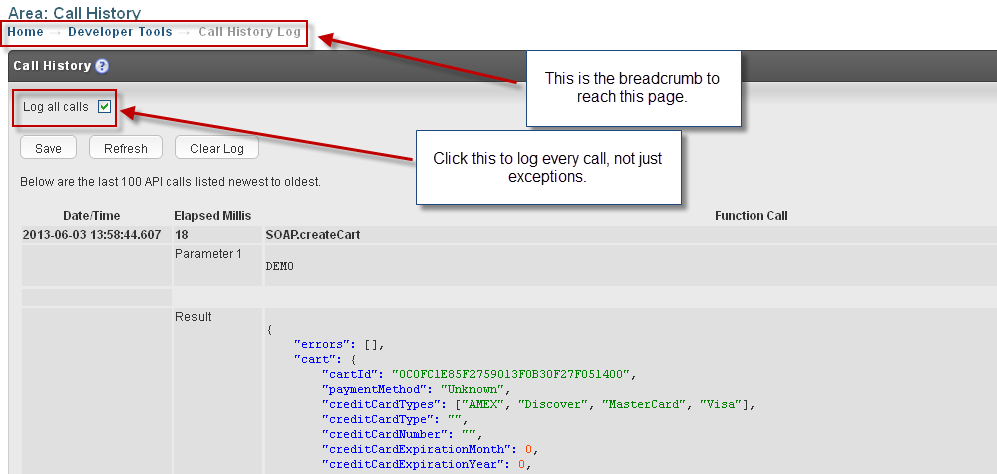
Detailed logs for errors may be captured on the UltraCart system. Optionally, the last 100 calls made may be captured as well.
To use:
- Ensure the login used to access secure.ultracart.com has "API Access". This may be granted by the account owner here: Configuration → Manage Users → Edit User.
- Once permission is granted, navigate to Developer Tools → Call History Log. It's a link in the Javascript Checkout API section.